
United Integrates Apple's New Share Item Location Feature for AirTag
United Airlines has integrated Apple's new Share Item Location feature for AirTag into its mobile app, enhancing baggage recovery for customers.
Sentiment and the balance of points
Rhea-AI Sentiment reads the wording of the document, how positive or negative its language is on a 1 to 5 scale. The balance of points shown with the takes weighs what the document actually discloses, so the two can disagree, for example when a trial that missed its main goal is described in upbeat language.
Rhea-AI Summary
United Airlines has integrated Apple's new Share Item Location feature for AirTag into its mobile app, enhancing baggage recovery for customers. This feature allows travelers to securely share the location of their AirTag or Find My network accessory with United's customer service agents, facilitating faster recovery of misplaced luggage.
With over 99% of bags arriving on time, this enhancement targets the fewer than 1% of bags that are delayed. Customers can now generate a Share Item Location link via the Find My app on their Apple devices and include it in a delayed baggage report within the United app. Authorized agents can view the item's location on an interactive map, which updates in real time, expediting the recovery process.
This feature is part of United's ongoing investments in infrastructure, training, and technology to improve customer service. For privacy and security, the shared location is disabled once the bag is found or after seven days. The new feature is available on iOS 18.2, iPadOS 18.2, or macOS 15.2 and later.
Positive
- United Airlines integrates Apple's Share Item Location feature, enhancing baggage recovery.
- Over 99% of bags arrive on time; feature targets improving recovery for fewer than 1% delayed bags.
- Real-time location sharing via the Find My app expedites the recovery process.
- Ongoing investments in infrastructure, training, and technology enhance customer service.
Negative
- None.
Details
News Market Reaction – UAL
The recorded move for UAL in the trading session of this news was -3.02%.
Data tracked by StockTitan Argus. Session date unavailable.
AI-generated analysis. How Rhea-AI works. Not financial advice.



Customers can now securely share the location of an AirTag or Find My network accessory with United customer service agents through the United app for faster bag recovery and an even better overall travel experience
United continues to invest in new infrastructure, training and technology to improve bag handling, resulting in significant improvement in baggage recovery in recent years
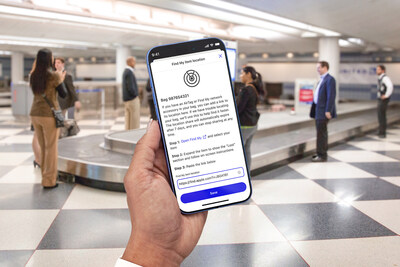
Now available with iOS 18.2*, Apple's Share Item Location feature enables United customers everywhere who travel with an AirTag or Find My network accessory to privately, securely, and seamlessly share the accessory location with the airline's customer service team to help locate their luggage in the event that it is mishandled.
While more than
"For years, every customer has been able to track the journey of their bag through the United app as it is scanned on and off the plane, and previously, they didn't have a way to directly share their AirTag information with our baggage team," said David Kinzelman, United's Chief Customer Officer. "Now, Apple's new Share Item Location feature will help customers travel with even more confidence, knowing they have another way to access to their bag's precise location with AirTag or their Find My accessory of choice. They can easily and securely share that with us in the United app, and our team can use the location information to find the bag and get it reunited with its owner much more quickly."
United offers all customers the ability to track their bags directly in the United app, giving them peace of mind throughout the entire travel journey. Now, customers will be able to generate a Share Item Location link in the Find My app on their iPhone, iPad, or Mac for an AirTag or Find My network accessory, and share that with United to help locate a misplaced item more quickly and securely.
Here's how it works:
- In the event a bag doesn't arrive to its final destination, customers can file a delayed baggage report in the United app, and those who travel with an AirTag or Find My network accessory can additionally now create a Share Item Location link in the Find My app on their iPhone, iPad, or Mac, and add that to the delayed baggage report in the United app.
- Once the report has been submitted, authorized United customer service agents will receive the Share Item Location link and be able to view the location of the item on an interactive map. The map will automatically update when a new location is available and show a timestamp of the most recent update.
- United will use the shared location to more quickly find delayed bags and reunite them with customers.
- For customers' privacy and security, the shared location will be disabled as soon as a customer is reunited with their bag, can be stopped by the customer at any time, and will automatically expire after seven days.
Share Item Location is built on the Find My network, a crowdsourced network of over one billion Apple devices — including the 120,000 iPhone, iPad, and Mac deployed by United — that use Bluetooth wireless technology to detect missing devices or items nearby, and report their approximate location back to the owner. The entire process is end-to-end encrypted and anonymous, so no one else, not even Apple or Find My Network accessory manufacturers, can view an item's location or information.
To experience the new feature, customers should verify that their iPhone is running on iOS 18.2 or later* and that their United app is up to date. For customers without the United mobile app, they will receive an automatic text notification with information to track misplaced luggage and add a Share Item Location link for their AirTag or Find My network accessory.
For years, United has led the industry on adding game-changing innovations and policies across the airline to help customers self-serve and increase transparency, including:
- Live flight updates for iPhone and Apple Watch: United was the first
U.S. airline to support Live Activities for iPhone, allowing customers to get live, personalized flight notifications for details such as countdown to boarding, gate number, seat, bag tracking and more right on their iPhone Lock Screen or Dynamic Island – all without opening the United app. Similarly, with Live Activities on Apple Watch, customers can access important flight information right from their wrist. The live updates have helped millions of travelers since last year especially during peak travel times. - Bag drop shortcut: United travelers can skip the check-in line and drop off bags in under a minute at the designated bag drop shortcut location at the curb or in the lobby by checking bags in the app before arriving at the airport. New this year, travelers who opt-in to TSA PreCheck® Touchless ID can drop off their bags in seconds by leveraging facial scanning technology at
Newark International Airport. - Real-time weather delay updates: Earlier this year, United started texting real-time radar maps to help customers understand how inclement weather in one part of the country can impact a flight elsewhere. United is the first and only
U.S. airline currently providing its customers these kinds of specific messages, and the airline is sending them with assistance from gen AI tools. - Automatic rebooking assistance during flight disruptions directly in the app: When travel doesn't go as planned, customers will get alternate travel options automatically served to them in the app. Saving travelers about 15 minutes in line on average, the tools help them get back on their way more quickly after a flight disruption or cancellation. Plus, only United offers Agent on Demand – allowing customers to scan a QR code or use the United app to video chat, text or call a customer service representative instead of waiting in line at the airport.
For more information, download the United mobile app here, and view media assets here.
*Apple's Find My Share Item Location Feature is available on iOS 18.2, iPadOS 18.2 or macOS 15.2.
About United
At United, Good Leads The Way. With

 View original content to download multimedia:https://www.prnewswire.com/news-releases/united-integrates-apples-new-share-item-location-feature-for-airtag-302329484.html
SOURCE United Airlines
FAQ
AI-generated questions and answers. How Rhea-AI works. Not financial advice.