
Apple advances health and fitness capabilities using Apple Intelligence and the most accurate heart rate sensing in a wearable
Apple links new Watch sensors with Apple Intelligence-powered Health app features, adding readiness scores, longevity insights, movement tests, and in-app lab ordering.
Sentiment and the balance of points
Rhea-AI Sentiment reads the wording of the document, how positive or negative its language is on a 1 to 5 scale. The balance of points shown with the takes weighs what the document actually discloses, so the two can disagree, for example when a trial that missed its main goal is described in upbeat language.




The all-new Apple Watch Health Sensing System enables a new readiness score and higher-frequency HRV, and a redesigned Health app offers users intelligent and actionable insights
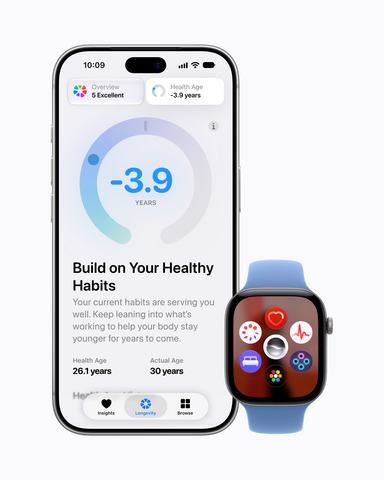
Apple Watch and iPhone deliver powerful and intelligent health and fitness insights.
“At Apple, we believe technology can empower everyone with actionable, science-based insights built with privacy at the core. By combining breakthrough sensing on Apple Watch with Apple Intelligence in the Health app, we’re able to translate complex biometric data into clear guidance for users,” said Sumbul Desai, M.D., Apple’s vice president of Health and Fitness. “This both helps people navigate their day-to-day routines with confidence and connects those moments with deeper context around their longevity, building a strong foundation for a healthier future.”
The New Health Sensing System on Apple Watch
The new Health Sensing System on Apple Watch Series 12 and Apple Watch Ultra 4 features new optical and electrical heart sensors, enabling higher-frequency heart rate and heart rate variability (HRV) measurements, a new readiness score, a more comprehensive Vitals overview with the addition of HRV, and an updated Heart Rate app.
Accuracy of health data is critical to providing meaningful insights. A scientifically rigorous study on a population of over 1,000 participants with representation across demographic groups compared the new heart rate sensing accuracy on Apple Watch against leading wearables, and resulted in Apple Watch showing the highest heart rate accuracy across devices.
With larger, power-efficient green LEDs on the optical heart sensor, Apple Watch Series 12 and Apple Watch Ultra 4 now measure heart rate every five seconds, all day long. This continuous, passive measurement delivers deeper insight into a user’s fitness and physiological state while making Exercise and Move Activity rings even more accurate. Users can view their real-time heart rate at a glance throughout their day — whether they’re recovering from a workout or dashing for the train — using the updated Heart Rate app and new watch face complications.
HRV, a key indicator of stress and recovery, is now measured as often as every five minutes — 24x more frequently — and available to view in a new section of the Heart Rate app. Apple Watch provides two separate variants of HRV for better understanding of a user’s health status. Recovery HRV is best to identify daily signals of stress and recovery, while overall HRV is best for insights on a user’s broader health, including cardiovascular health. Higher variability is generally associated with better overall recovery.
Overnight vitals now includes Recovery HRV analyzed against a user’s personal baseline, providing a more complete view of their health status. A new daytime vitals view lets users toggle between overnight and daytime metrics, and can potentially spot shifts in their metrics before they show up overnight.3
Readiness: A Daily Read on the Body’s Capacity
Apple Watch Series 12 and Apple Watch Ultra 4 introduce readiness — a new feature that analyzes a user’s recent activity, vitals, and sleep score, and then provides a single 0-10 score each day with a clear, actionable recommendation: Recover, Pace Yourself, Ready, or Go For It. This helps a user decide how to take on their workday or tackle their training plan.
Readiness updates throughout the day as new data comes in, reflecting, for example, an intense workout or a shift in daytime vitals. Readiness clearly highlights which factors are driving the score and allows users to tap into more details. The scoring algorithm was developed using data from the Apple Heart and Movement Study, in collaboration with exercise scientists and physicians at Apple.
A Redesigned Health App with Apple Intelligence at Its Core
The Health app on iPhone is a central and secure location for a user’s health and fitness information, and can uniquely provide a better understanding of their overall health. Apple Intelligence brings powerful AI capabilities into the apps and experiences users rely on every day, making them more personal and helpful than ever, and with iOS 27 and iPadOS® 27, Apple Intelligence extends to the Health app. Redesigned to dynamically adapt to a user’s personal health and fitness metrics, the Health app now offers iPhone and iPad® users a view of their long-term health alongside easy-to-understand insights, providing personalized guidance that can help them live a better day and healthier life. The redesigned Health app has been built to securely and privately protect a user’s data at every step.
Insights Tab
The new Insights tab surfaces timely health information with a summary that updates throughout the day across heart, sleep, readiness, fitness, vitals, and cycle tracking data. A new For You section delivers personalized recommendations and relevant articles based on a user’s data — like a suggestion to improve a wind-down routine after a stretch of late nights.
Longevity Tab
A new Longevity tab analyzes a user’s longitudinal health data for deeper insights into heart health, sleep, mental wellbeing, movement health, metabolic health, hearing, and nutrition. The tab includes Health Age, a new feature that uses Apple Watch data to show users how their metrics are tracking relative to their chronological age, informed by the best available science. The algorithm can factor in metrics from Apple Watch like VO2 max, resting heart rate, sleep, and HRV, and users can also add lab data, including A1c and LDL, to enrich the analysis.
Within the Longevity tab, users can see what’s shaping their long-term health based on data from iPhone, Apple Watch, AirPods®, and clinical health records, as well as third-party apps and devices. An informative visualization fills in each category, helping users understand their status in different areas of health. Users can further build out their health picture through new evaluations, at-home movement assessments, and the ability to add lab tests.
Movement Evaluations
Mobility is a critical marker of overall function and a strong predictor of independence, chronic disease risk, and quality of life. Yet routine assessment remains largely absent from proactive health management, typically requiring a visit to an exercise physiologist or physical therapist. Now, users can take in-depth physical assessments — measuring flexibility, strength, balance, movement mechanics, and VO2 max — right at home using their iPhone camera and Apple Watch. This experience runs entirely on device; no video is ever recorded, stored, or shared. Using vision-based AI models, these assessments provide real-time audio and visual feedback, and were developed using clinician input.
Labs
Lab results from routine testing can provide important insights into a user’s overall wellbeing. Health app users can already import existing labs and see their results and trends over time. Users will be able to schedule and purchase new labs that feature over 50 key biomarkers for
Tailored Health Content
Users will be able to see videos and articles across each area of health that overlays their data with insights from Apple Health clinical experts explaining why it’s important. For example, after a user receives their annual lab results, the Health app will present a video from an expert explaining their LDL levels, what the data means, and how they can take steps to improve, if needed. Or if a user learns from their movement assessment that they need to work on their balance, the Health app will present a video from an expert explaining what they can do. They will also receive an exercise plan to help them improve their balance, with moves selected for their ability and needs.
The redesigned Health app will be available later this year, starting in
Perimenopause and Menopause Support Arrive on Cycle Tracking
A person’s menstrual cycle is an essential indicator of overall health, and the Cycle Tracking experience is designed to support individuals across life stages, from logging their first period to receiving a retrospective ovulation estimate, and now, to supporting perimenopause and menopause. Cycle Tracking adapts as users’ health priorities change, whether that’s rooted in curiosity, daily planning, family building, or long-term wellbeing.
With iOS 27, the Health app adds support for perimenopause and menopause, as well as notifications about cycle deviations inclusive of perimenopause, to Cycle Tracking. Users will be able to log if they are in perimenopause or menopause for further customization of their Cycle Tracking experience, track their symptoms, and monitor cycles over time. Additionally, if a user logs bleeding after menopause, they will receive a notification to speak with their doctor. New educational articles are available in the Health app to help users better understand this new chapter, in addition to tips informed by clinical experts.
Additionally, many people don’t recognize they’re in perimenopause because the symptoms can start years before their last period. Now, users age 40 and over can receive a notification if a deviation in their logged cycle patterns is suggestive of perimenopause, so they can speak to their doctor about it at their next appointment.4
More Ways to Stay Healthy
With iOS 27, iPadOS 27, macOS® 27, and watchOS® 27, Apple introduces additional ways to stay healthy:
- Workout Buddy works on Apple Watch even when users don’t have their iPhone nearby. The feature also now incorporates even more fitness data when delivering motivational insights, and is available in both English and Spanish.5
- Expanded GymKit® functionality enables users with AirPods Pro® 3 to sync their heart rate data through iPhone with compatible gym equipment, including treadmills and indoor bikes.
- More accurate treadmill readings, powered by new machine learning models, improve distance calculations from the very first step of a walk or run.
Availability
- watchOS 27 will be available for Apple Watch Series 9 or later, Apple Watch SE® 3, and Apple Watch Ultra 2 or later beginning Monday, September 14, and requires iPhone 11 or later or iPhone SE 3 with iOS 27. Not all features are available on all devices or in all regions. For more information about availability, visit apple.com.
- The redesigned Health app will be available on Apple Intelligence-enabled iPhone and iPad models with the latest software, with select features available only on iPhone. Some features may not be available in all regions or languages. Health Age requires Apple Watch. The test to estimate VO2 max requires Apple Watch, AirPods Pro 3, or a third-party heart rate sensing device. Some features require users to be 18 or older. For information on Apple Intelligence availability, visit support.apple.com/en-us/121115.
- Features are subject to change. Some features may not be available in all languages or regions, and availability may vary due to local laws and regulations. For more information about availability, visit apple.com.
Footnotes
- Based on data from an Apple-conducted study of heart rate accuracy, during July and August 2026, utilizing commercially available bestselling wearables available as of June 2026. For more information, visit apple.com/hraccuracy.
- Apple Intelligence is available with Siri® and device language set to Chinese (simplified), Chinese (traditional), Danish, Dutch, English, French, German, Italian, Japanese, Korean, Norwegian, Portuguese, Spanish, Swedish, Turkish, or Vietnamese. Some features may not be available in all regions or languages. Some devices may not be available in all regions. Certain Apple Intelligence features that rely on server-side models are subject to daily usage limits, including but not limited to Siri AI, intelligent photo editing tools, Image Playground™, and AFM 3 Cloud models in Shortcuts. Daily limits may vary by feature, request complexity, system demand, system policies, and other factors. Expanded access to such features will be available for a fee in the future. Use of these features is subject to Apple Intelligence terms and conditions. Learn more at apple.com/apple-intelligence. Siri AI is not available to users under 13.
- The Vitals app is for wellness purposes only and not for medical use.
- Cycle Tracking should not be used as a form of birth control.
- Requires a paired Apple Intelligence-enabled iPhone and Bluetooth headphones with device and Siri language set to English or Spanish. Using Workout Buddy without iPhone nearby requires a Wi-Fi or cellular connection. Some features may not be available in all regions or languages. For feature and language availability and system requirements, see support.apple.com/121115.
NOTE TO EDITORS: For additional information visit Apple Newsroom (www.apple.com/newsroom), or email Apple’s Media Helpline at media.help@apple.com.
© 2026 Apple Inc. All rights reserved. Apple, the Apple logo, Apple Watch, iPhone, Apple Watch Ultra, Apple Intelligence, iPadOS, iPad, AirPods, macOS, watchOS, GymKit, AirPods Pro, Apple Watch SE, Image Playground, and Siri are trademarks of Apple. Other company and product names may be trademarks of their respective owners.
View source version on businesswire.com: https://www.businesswire.com/news/home/20260909479755/en/
Zaina Khachadourian
Apple
zkhachadourian@apple.com
Lance Lin
Apple
lance_lin@apple.com
Source: Apple Inc.